Credits & the cost gate
pod never spends your money without showing you the bill first. This page explains what credits are, why drafts are cheap, and every way the studio protects your balance.
What credits are
Making a film with pod means asking cloud AI models to paint images and shoot video for you. That work is paid for in credits. Where those credits live depends on your account:
- Own-key accounts (most users): your credits sit in your own generation account at kie.ai (your account, your balance). Topping up about $5 is enough to start. See setting up your keys.
- Managed studio accounts: generation is included, up to a monthly credit cap. You never enter a generation key, just your license key.
Two commands keep you oriented, any time, inside the studio (no cost to run them):
❯ credits
  (shows your current balance)
❯ estimate --runtime 120
  (previews what a ~2-minute film would cost, per model option)
Curious what a specific idea would cost before committing? cast "two robots fall in love at a bus stop" runs just the casting and price preview: about 1 credit, and nothing else happens.
Where the money actually goes
Stills are cheap; video is the expense. Character sheets, reference images and keyframes cost around 8 credits an image, so iterate on those freely. Video is priced per second, and the price climbs steeply with resolution: a second of 480p draft costs about a tenth of the same second mastered at 1080p, and under a quarter of a 720p master.
That gap is why pod works the way it does.
Draft → master: iterate cheap, master once
Every clip in your film is first rendered as a cheap 480p draft. All the reviewing, note-giving and re-trying (the part of filmmaking where takes get thrown away) happens on drafts. Only when a shot's motion is right does the master render at delivery resolution, and it renders once per shot.
In practice: if a shot takes three tries to get the camera move right, you paid draft prices for the misses and master price only for the keeper.
Watching the money in Pod Studio
The browser view, Pod Studio, keeps your spending in plain sight, so it never sneaks up on you. Your real credit balance sits in the header at all times, and during a shoot a −N this run counter ticks up beside it, so you literally watch the credits leave as footage renders.
Open a film and, right next to its title, pod shows what it has spent so far against the estimate you approved at the cost gate. For example: 2,158 cr spent · est. 1,845 cr. If real spend crosses the estimate, that line turns red and says so plainly (+313 over estimate): no quiet overruns. Click costs and it opens into a per-shot breakdown: a bar for each shot with its credits and how many attempts it took, plus a split between clip-shot spend and reference images.
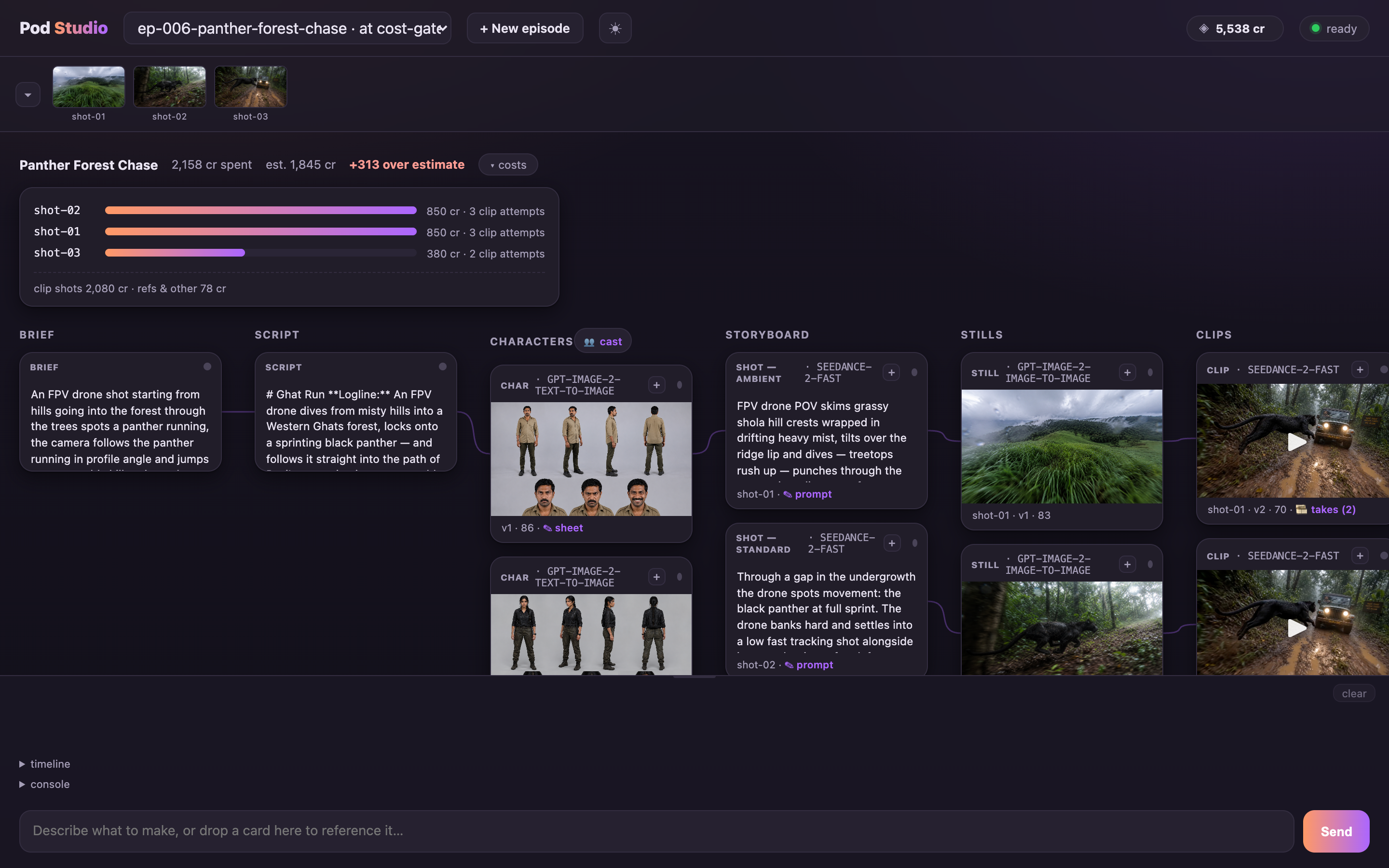
None of this costs anything to look at, and none of it spends on its own. It's simply the receipt, kept open while you work, so the decision at the cost gate is always an informed one.
The cost gate
Before any footage renders, always and in every mode, pod stops and shows you the exact credit estimate for the shoot. This is the cost gate, and it has three answers:
| You type | What happens |
|---|---|
| y | Go. The shoot starts. |
| d | Drafts only. pod shoots the whole film as cheap 480p drafts so you can watch a full cut first. When you're happy, finalize <name> masters it at full resolution. |
| N | Stop. Completely free: your plan is saved, and resume picks up exactly here later. |
You can also change the casting right at this gate ("use omni for the hero shots", "kling for the clips"), and the estimate updates before you decide.
❯ produce "90-second telugu teaser, vertical, moody" --drafts-only
(skips straight to drafts-only mode — watch the cheap cut, finalize later)The cost gate is the one stop pod always makes: no footage renders until you approve the exact estimate. In full control, the mode that runs today, you approve every other gate as well. See the modes and the gates.
Budget caps
Want a hard ceiling regardless of estimates? Add one when you start:
❯ produce "episode 2 of the basti pdf" --budget 800
  (pod pauses the run if spending reaches 800 credits)
During the shoot, a live line keeps score: clips done · time in · credits spent · estimate remaining. You're never guessing.
Edits are free. Re-shoots ask first.
At the final screening, notes like "cut the first 3 seconds" or "pacier" are edits, recuts from footage you already own. Edits are free, always. So is edit <name> "note" after delivery.
A re-shoot means actually generating new footage, and it works differently: pod always asks first and shows the price before anything renders. And a plain "no" at any gate never spends a thing; pod just asks what to change. More in fixing things.
You never pay twice
Renders happen in the cloud, so if your laptop closes mid-shoot, or pod crashes, or a generation times out, the work you already paid for is not lost. pod remembers every take it ordered. On resume, it collects the finished results (or keeps waiting for ones still cooking) instead of ordering them again.
resume. The film continues from the exact checkpoint.Managed accounts: the monthly cap
On a managed account, generation is included up to a monthly credit cap. pod warns you as you approach the cap, so a shoot never surprises you. If you need more headroom, your studio contact tops up the allowance. You never handle a generation key or a balance yourself.
The short version
- Stills: cheap, iterate freely. Video: per second, by resolution.
- Iterate at 480p, master once. That's the draft→master protocol, built in.
- Nothing renders past the cost gate without your y (or d for a cheap full cut first).
- Edits free, re-shoots priced and always asked.
- Interruptions never double-bill:
resumecollects paid work.