Projects & client access
A project is one client engagement, and a client's view of your studio is exactly the projects they're a member of, nothing more and nothing less.
What a project is
A project belongs to your studio and normally represents one account you're working for: the Chai & Co retainer, the Ramesh Motors campaign, that six-episode serial for a producer in Chennai. It carries a slug you type (chai-serial), a display name, and a client label. The client label is the customer's own name for themselves, and it's what appears on their side of the system.
Episodes belong to projects. When your cinematographer pushes ep-001-the-first-pour under the chai-serial project, that episode is now inside that engagement. Everything that follows, from who can be shown it to what the customer finds waiting in their portal, follows from that one fact.
general project. It's created for you with the studio and it's where internal work lands: showreels, tests, pitches, the episode you made to prove a look to yourself. It has no client label and no client members, so nothing filed there is ever visible to a customer. If you never do client work, you'll never think about projects again: everything quietly goes to general.Who is on a project
The owner creates a project and assigns members to it, and members come from both sides of the house:
- Employees: "my cinematographer and my editor work the Chai & Co account". This is an assignment, not a permission grant: your crew could already see the work (see seats & roles). What membership does for a studio seat is put them on the record as the people responsible for it, and give them somewhere to hold a publishing grant.
- Client seats. The customer's login. Here membership is everything. Adding the Chai & Co seat to the
chai-serialproject is the single act that makes any of your work visible to them, and removing it is the single act that stops it.
Client visibility is project membership, full stop. There is no second setting, no per-episode sharing toggle, no "visible to client" checkbox to forget. If a customer can see something, it is because their seat is on the project that something belongs to, and because a cut inside it was surfaced to them, which is the next page.
That holds for the no-password review links too, which is the honest test of a rule like this. A link is minted only for the active client seats on the project, and it re-asks the question on every request: remove that seat from the project and the link they were sent stops working, mid-playback if that's the moment. Membership is not just what opens the door. It is what keeps it open.
A client is scoped, not merely filtered
It's worth being precise about what "sees only their projects" means, because it's the promise your customer is trusting you with. A client seat is a guest in your studio, and the boundary is enforced where it counts: not by hiding cards in a page, but by the system refusing to answer for anything outside their scope.
| A client seat can | A client seat cannot |
|---|---|
| See the episodes in their own projects, by name and status | See any episode in a project they're not on |
| Watch a cut that was surfaced to them | Reach a cut that wasn't, including an earlier take of one that was |
| Approve, request changes and comment (from the portal or a review link) | See drafts, alternative takes, character sheets, shot prompts or production state |
| Upload a screenplay or hand over reference material | Download your source assets, or browse anything they didn't send |
| Read the decision history of their own episodes | See who works for you, or that other customers exist at all |
Two customers on two projects in the same studio are invisible to each other. Neither can tell the other exists, how many people you employ, or what else you're working on this month.
What a client can send you
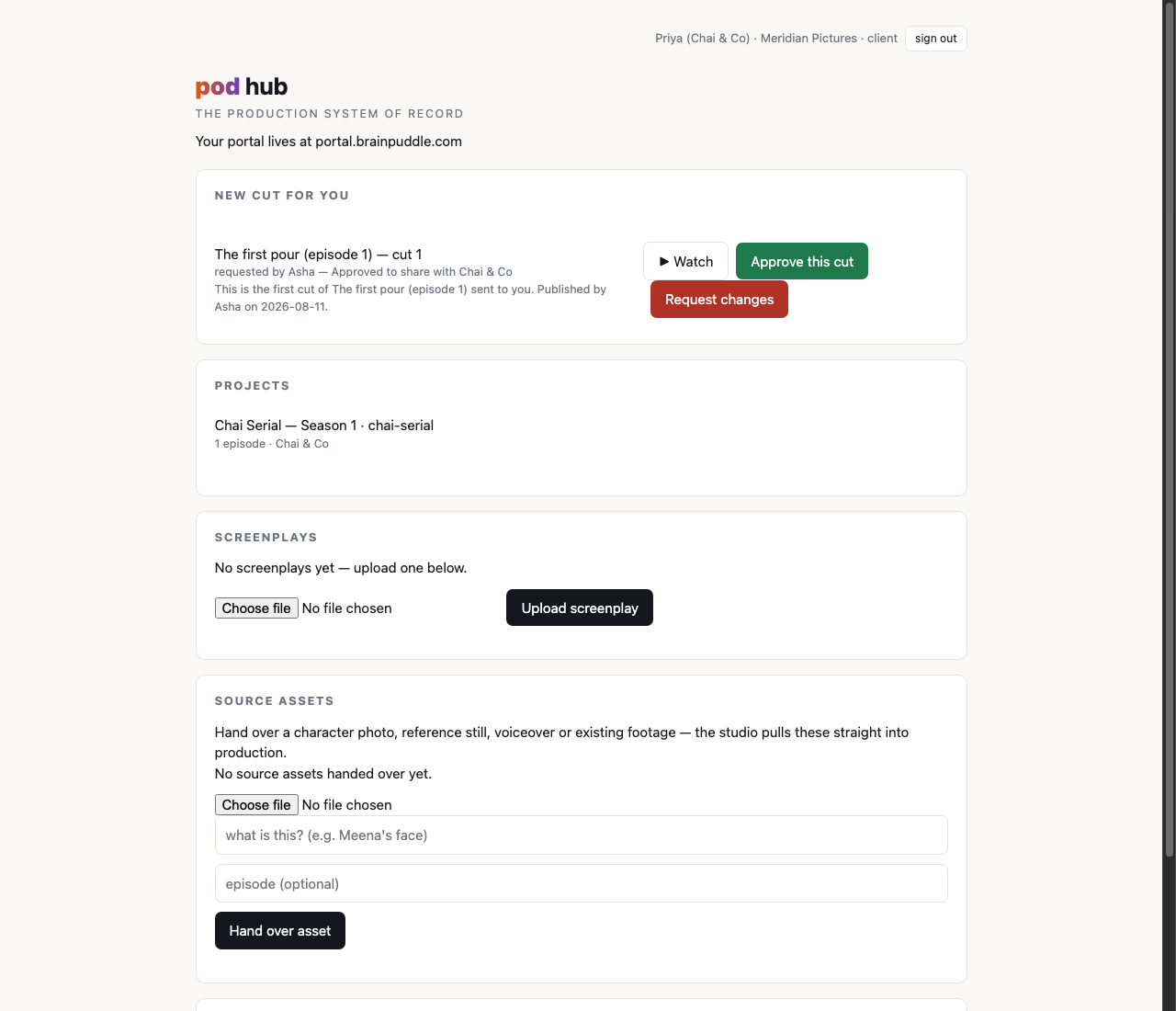
The portal runs in both directions. Under the cut they're being asked about sit two upload cards: screenplays (a PDF, a text file or a fountain script, for the episode you haven't made yet) and source assets (a character photograph, a reference still, a voice recording, a clip they want cut in), each labelled with what it is and optionally with which episode it belongs to.
Those land on your side of the hub, and your operator pulls them straight into an episode's workspace with one command, where they behave exactly like any other material you'd hand pod yourself. See hub, portal & the terminal for the command, and using your own media for what the pipeline does with them.
Trust, per project: the publishing grant
Now the interesting part. By default, when a member of your crew finishes a cut and submits it, that cut does not go to the client. It goes to your approval queue. You look, then you decide. That's the safe default and it's what every new member starts with.
But a studio that's been running for two years doesn't want its owner in the middle of every routine delivery. So membership carries one grant: can publish, a checkbox beside that person's name on that project. Give it to a studio member, and their submissions go straight to that client, no queue, no waiting for you.
Four things about the grant are worth stating plainly, because they're what make it safe to hand out:
- It's per project, not per person. Your senior editor can publish directly to the client they've handled for a year, and still land in your queue on the account you signed last week. Trust is a relationship with a specific customer, and the grant models it that way.
- It covers their own work only. A grant holder's own submissions surface as they file them. It never lets them release a colleague's cut: if they stand behind somebody else's work, they submit it themselves and their name is on it. Approving another person's submission stays the owner's job, always.
- It never hides the publish. A direct publish still writes both events (this person submitted, this cut was surfaced) into the record. What the grant removes is the wait, not the trace. Six months later it's plain who published what under whose standing authorization.
- Client seats can never hold it. The grant is a studio-side thing, and the checkbox isn't even offered on a client member. A customer approving their own cut isn't a workflow, and the system won't record one.
What the owner does, in practice
Setting up a new customer is three decisions and about a minute:
- Create the project. A slug, a name, and the client's own label for themselves.
- Assign your people. Whoever is actually working the account, with or without the publishing grant.
- Invite the client seat and add it to the project. You copy the one-time link out and send it to them yourself; they set a password and land in their portal looking at an empty project. That's correct, because you haven't surfaced anything yet. From then on, the cuts you publish reach them as a link they can tap without signing in again.
From your crew's side, filing work under it is one flag on a push, once per episode. That's on hub, portal & the terminal.
Next, the publish gate: how a finished cut actually reaches the customer.