The publish gate
One controlled crossing between your studio and your customer: work is submitted, the owner decides, and only then does a client see a frame of it.
The problem it solves
Every studio has a version of the same accident. An editor sends a link to the customer with the wrong cut behind it: the one with the temp voice-over, or the one from before the client's last round of notes. Nobody was careless; there just wasn't a gate. A file was in a folder and a folder had a link.
The publish gate is the fix: work does not become visible to a customer because it exists, or because it was uploaded, or because someone knows its address. It becomes visible because a person submitted it and a person approved it, and both of those are recorded.
How a cut reaches a client
The five moves
1. Submit
Any studio seat can submit a cut for client review: they pick the episode, pick the exact video, and add a note if there's something the client should know before watching. From the terminal that's one command, pod push <episode> --submit --note "…", which sends the footage and files the cut in the same breath. Submitting does not show anybody anything. Until it's approved, that cut is as invisible to the customer as it was five minutes ago.
What gets submitted is the review copy pod cuts beside every master: the same film at about 540p, so a client pressing play isn't streaming a full-resolution delivery file. The master's fingerprint is recorded alongside it, so an approval still names the file that ships. See the rework loop for how both are pinned.
2. The queue
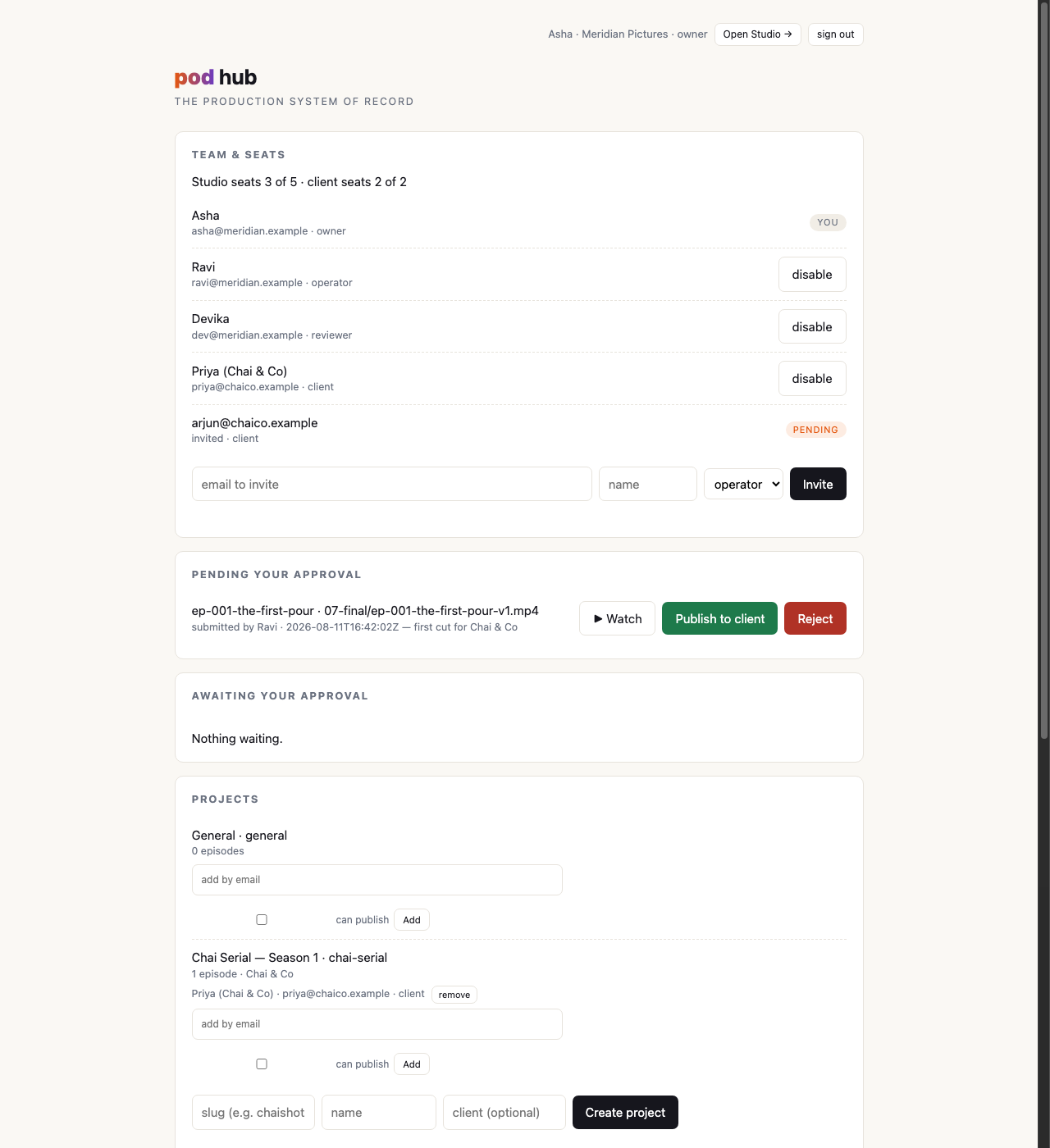
A submission lands in the owner's approval queue, under Pending your approval at the top of the hub, with the episode, the exact file, who submitted it, when, and the note they sent with it. The cut plays right there. The queue holds one live submission per episode: submit a better cut and it replaces the pending one, so you're never approving something stale by accident.
3. Surface, or reject
The owner has exactly two answers.
- Publish to client, and the cut is surfaced: that is the moment, and the only moment, at which the client can see it. Their portal picks it up immediately, and the same click mints the review links described below.
- Reject, with a note. The note is internal: it goes back to the submitter and nowhere near the customer. "The grade is green in shot 4" is a thing you should be able to say to your own editor without your client reading it. Nothing about a rejection is visible outside your studio. A rejection with an empty note is refused outright: sending work back with nothing to fix is not a decision, it's a delay.
4. Send it
Surfacing a cut also produces a review link for every client seat on the project, handed back on the spot with a Copy link control and a Send on WhatsApp button that opens your own share sheet with the message already written. The customer taps it and the cut plays (no password, no sign-in), with approve, request changes and comment right there. A cut that surfaced but nobody was told about is a cut nobody watched, so publishing and having something to send are one action rather than two.
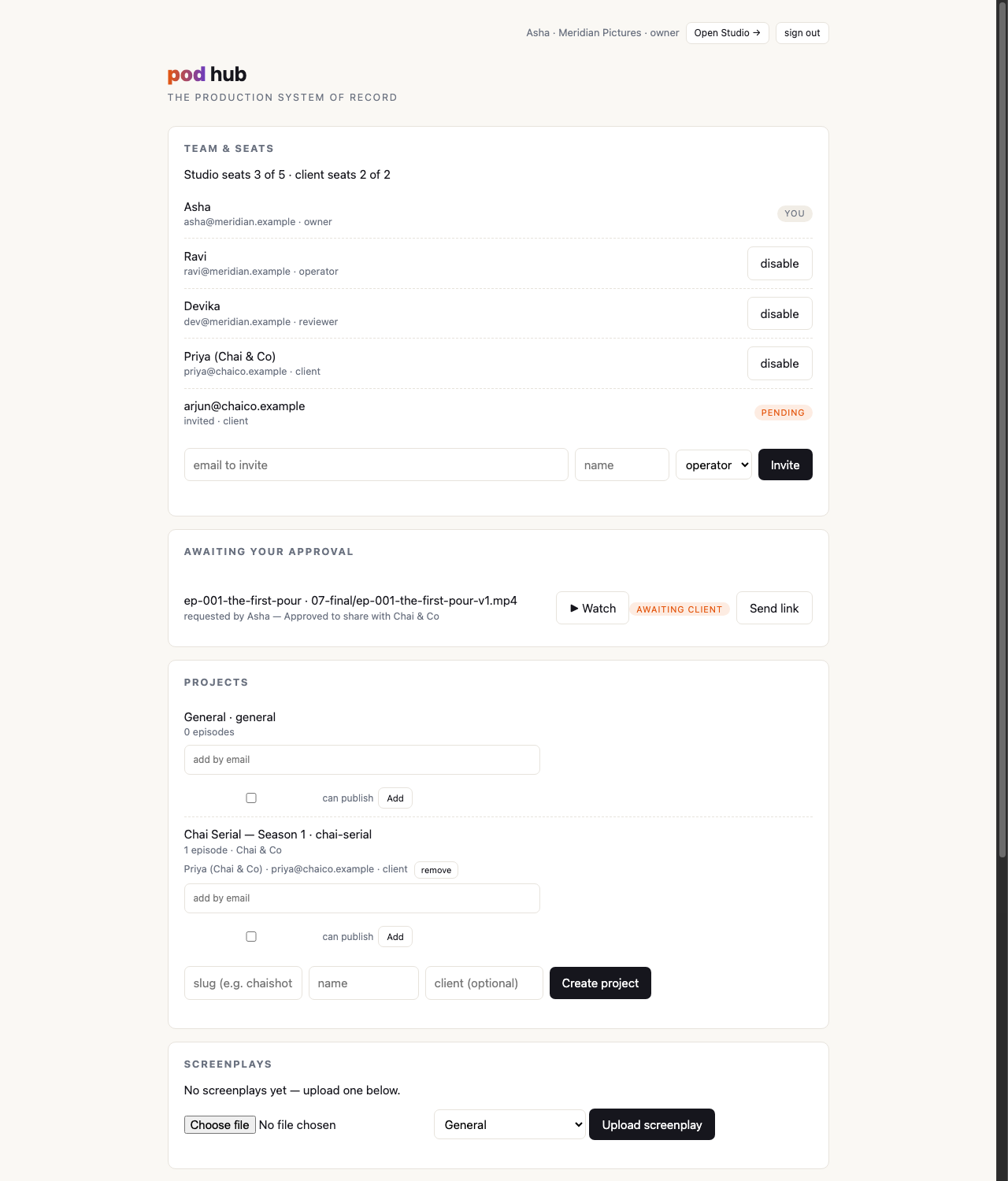
The links are handed over once, at the moment of publishing, and a page refresh loses that card. That's what the Send link control on the awaiting client strip is for: it produces them again for whatever cut is currently up. What the link is, how long it lives and what kills it are on rework & the notes loop.
5. The client answers
Once surfaced, the customer watches and responds: approve, request changes, comment, or file notes on specific shots. That's its own loop, and it has its own page: rework & the notes loop.
When submission surfaces immediately
Two people can skip the queue, and only these two:
- The owner. Approving your own submission is a formality with an extra click in it, so there isn't one. An owner's submission surfaces on the spot.
- A studio member holding the publishing grant on that project, for cuts they submitted themselves. That's what the grant means: standing authorization to put your own work in front of this particular customer without a second pair of eyes. See projects & client access.
In both cases the shortcut is a shortcut in time, not in record-keeping. Two events are still written (the submission and the surfacing), with names and timestamps on each. Nothing about a direct publish is quieter than a queued one; you can always see who published what, and under whose authority.
What each side sees, at each state
| State | Your studio sees | Your client sees |
|---|---|---|
| Pushed, not submitted | The episode and all its files, drafts and takes included | The episode name and status, no video at all |
| Submitted, pending | Everything, plus "awaiting approval" on the owner's dashboard | Nothing new. No notification, no link, no hint |
| Rejected | The rejection and its note, on the episode's record | Nothing. Rejections never leave the studio |
| Surfaced | Everything, plus "sent for review" and when, and a review link per client seat, ready to send | This one cut, playable, with the note that came with it: in their portal, or straight from the link, no sign-in needed |
| Client approved | The approval, pinned to the exact cut approved | Their own approval, and the cut it applies to |
| Changes requested | The request, the shot items your operator files from it, and the episode reopened for work | Their request, and the cut it was made against |
Note the second row in particular: a pending submission is completely silent on the client's side. Your customer cannot tell that you submitted something and your owner hasn't got to it yet. Your internal timing is yours.
Superseding a cut
When you surface version two, version one stops being the current cut, but it does not vanish, and neither does what was said about it. The client's portal shows them the cut they're being asked about now; the record keeps every version, every approval, and which exact bytes each verdict applied to. That last part is what makes an approval mean something six months later, and it's the subject of the decision record.
The review link you already sent retires at the same moment. Replace the cut under the same filename and the old link stops working outright; publish the new one under a different name and the old link can still show what was sent, but it can no longer approve anything. Either way, the sign-off you get back is a sign-off on the cut that is actually up.
Next: rework & the notes loop, what happens after the client presses play.