Rework & the notes loop
What happens after the client presses play: a link they can tap without a password, three ways to answer, a shot-level request board on your side, and a round trip back through the same gate.
How the client gets in
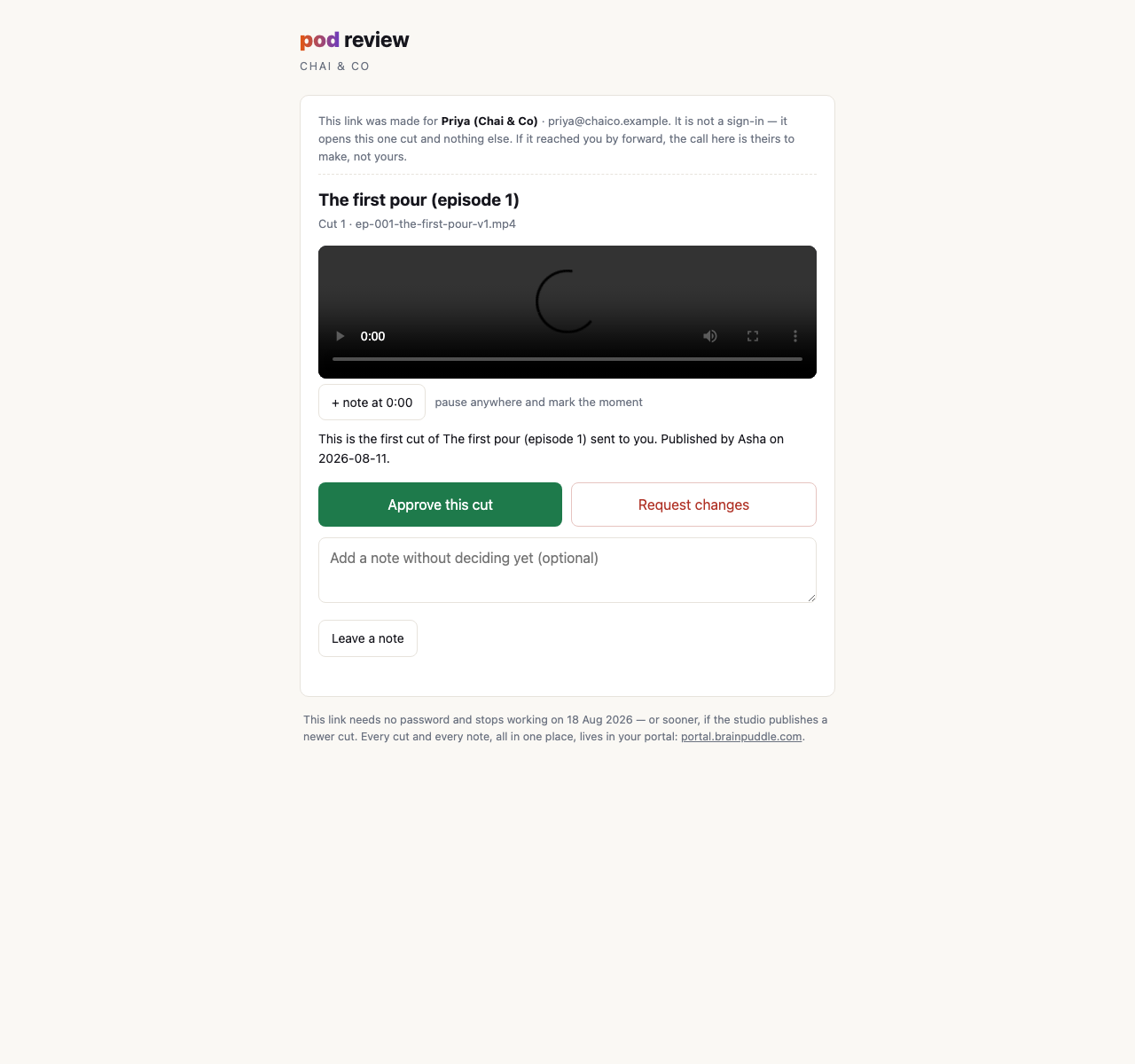
The moment a cut is surfaced, pod mints a review link for each client seat on that project and hands them straight to the person who published it: one row per client, each with a copy control and a WhatsApp share button that already has the message written. Your producer taps it, picks the chat, sends it. The customer taps the link on their phone, the cut plays, and they can approve it, request changes or leave a comment. No password, no account sign-in, nothing to remember.
That shape comes from one specific failure. There is no email in this system and no password reset, so a customer learns a cut is ready because a person messages them. A message that lands on a login page is asking for a password set weeks earlier, in whatever browser their chat app happened to open at the time. The predictable answer is to give up on the portal and send the MP4 over chat instead, at which point the gate, the pinned approval and the record hold nothing at all. A review system people route around is not a review system, so the link itself carries the authority.
What the link is, precisely
It is a capability, not a session. It sets no cookie, signs nobody in, and upgrades to nothing. What it opens is one surfaced cut (watch it, approve it, ask for changes, comment), and that is the whole of it. No other episode, no other project, no upload, no file index, no shot board, no list of the people who work for you. Those doors are shut to it in the system itself, not merely left off the page.
- It expires, and it is theirs. A review link lasts seven days: long enough that "I'll watch it tonight" still works on Thursday, short enough that one forwarded onward goes cold. It names the seat it was minted for and the page says so out loud, so a person holding somebody else's link can see that the call isn't theirs to make. (Inside the portal, the in-page player uses its own short-lived signed URL, good for an hour. The week belongs to the link you send.)
- Every switch you already have kills it. Each request re-asks the whole question: is the seat still active, is the studio still running, is this person still on the project, and are these still the bytes that were surfaced. Take the client off the project, disable their seat, sign them out everywhere, or let the licence lapse, and the link stops resolving, mid-playback if that's when it happens. Seven days is a ceiling, never the thing holding the door shut.
- It is pinned to the exact bytes. The link binds to the content of the video that was surfaced, not to its name or its slot. If a file called
final-v2.mp4is replaced in your workspace with different footage, the customer's link does not quietly start serving the new footage. They watch what they were shown, and their approval attaches to that. - Two fingerprints, because they watch a review copy. What streams to a client is the light ~540p review cut, so the record pins both: the fingerprint of the video they actually watched, and the fingerprint of the full-resolution master it was made from. An approval therefore names the file that ships, not just the one that played. Both are fixed at the moment the cut is submitted, and every later entry about that cut (published, approved, changes requested, from the portal or from a link) reads them off the submission rather than from whoever is answering.
- A newer cut retires it. Publish a new cut over the same filename and the old link stops working outright. Publish one under a different name and the old link can still show what was sent, but it can no longer decide: an approval from it is refused with "that cut is not the one up for your review". Nobody signs off a cut that has been replaced.
A link that has stopped working gets a calm page saying so and a way into the portal. It is the same page whether it expired, whether you published something newer, whether the seat was switched off, or whether it was never a real link in the first place. Those cases deliberately answer alike, because none of them has a different remedy: sign in and you're looking at wherever things actually stand.
Getting the link back
The links are handed over once, at the moment of publishing, and a page refresh loses that card. So the strip that says awaiting client carries a Send link control: it produces the links again for whatever cut is currently up with that customer. Same people, same cut, same week. It mints nothing new in any sense that matters, and it means the recovery from a closed tab is never "re-submit the cut" or "tell them to sign in".
The three things a client can do
The same three answers, whether they came in through the link or signed into the portal.
Approve
The cut is signed off. The approval is written against the exact video approved, with the customer's name and the time on it. This is the outcome the whole system is arranged around, and it takes one click.
Request changes
Sends the cut back with a written reason, the place a customer says "shot 7 has the old packaging on the cup". The episode reopens for work on your side, and the customer's portal stops asking them to decide: they've decided, and the ball is yours.
Leave a note
Free text on the episode, with no verdict attached: the box is labelled "add a note without deciding yet", because half of what a customer wants to say isn't a yes or a no. Notes flow both ways: your crew can leave one for the customer ("this one's the 60-second version, the 30 follows tomorrow") and the customer can leave one back. They sit on the episode's record in order, so the conversation about a film lives with the film instead of in three inboxes.
A note can also be pinned to a moment. Pausing the player puts the timecode on a + note at 0:14 button, and what they write is filed against that second of the cut. "The music comes in too early" is a different note from "the music comes in too early here", and your editor gets the second one.
The request board, on your side
A change request arrives as prose, and prose is where notes go to get lost. So the studio side of an episode has a board: one row per shot, and against any shot a request that is filed as a kind rather than buried in a paragraph.
| Kind | What it means | Typical wording |
|---|---|---|
| regen | Shoot this shot again: the take itself is wrong | "Her hand goes through the cup at the end" |
| style | Keep the take, change the look | "Warmer grade, this reads cold for a tea brand" |
| note | An observation, no action implied | "Love this one, use it in the cutdown" |
The kind is stored as a kind, which is why the board can show three re-shoot asks and one compliment rather than four undifferentiated messages. Your operator works down the open items exactly the way they'd work down a page of notes from a director, except that each one can be resolved, and resolving it is recorded.
Resolving isn't the same as agreeing. An item can be closed because you fixed it, or because you looked and disagreed, and the resolution carries your note either way. Closing one with no note isn't allowed: "someone dealt with it" is not an answer anybody can act on. At the end of a round, nothing on the board is ambiguous about what happened to it.
You don't have to go to the hub to work them, either. pod notes <episode> reads the whole list back in the terminal, and in Pod Studio the same notes are stamped on the shot they're about, with a "mark done" control on each. A note the customer left at a timecode lands on whichever shot was on screen at that second, marked as having arrived by its timecode rather than by their aim, so you can tell a deliberate "shot 7" from a "here".
How much of the board a client can reach
The board itself is studio-side: a client seat cannot open it, cannot see the kinds you filed, and cannot read your resolutions. When your operator closes an item with "looked at it, disagree, here's why", that sentence is for your crew.
What a customer can do is point at a moment, and that is most of what pointing at a shot was for. Their timecoded note arrives as an open item on the same board, in the same list as everything your own people filed, closed by the same "mark done". What they can't do is choose a kind, or say "shot 7" in the system's own words rather than by pausing on it.
regen or style request against a named shot is not, and no date is promised for it. The board is built to take it, and if your studio wants it, saying so is what gets it built: feedback inside the studio, or thebrainpuddle@gmail.com.One thing it would not change, worth stating now because it's the reason the board is shaped this way: an ask never becomes an instruction. A customer filing a regen would put a line on a board, exactly as it does today when your reviewer files one.
One full round trip
Put end to end, a round of revisions looks like this, and every step of it is one line on the episode's record:
- Your editor pushes the new cut from their machine and submits it.
- The owner watches it and surfaces it (or rejects it with a note, and the round starts again inside the studio). The review links come back with that click, and somebody sends one.
- The client taps it, watches, and requests changes: the cup in shot 7 has the old packaging, and shot 3 is the one they love.
- Your editor puts that on the board as two items (a
regenon shot 7, anoteon shot 3), resolves both with a word on each, and re-renders shot 7. - A new cut is submitted, through the same gate, no shortcuts, unless the editor holds the publishing grant on that project.
- The client watches the new cut and approves. It arrives on a fresh link, because putting this cut up retired the last one, and the approval names the exact video it applies to.
Nobody in that list has to ask which version the other person is looking at, or go digging through a thread to find out what was agreed. The one thing the loop still does not do is tap your customer on the shoulder: pod sends no mail and raises no notifications, so "the new cut is up" is a message a person on your side sends. What the loop takes off your desk is everything after that message, starting with the part where it lands on the film rather than on a login form.
What the client never sees during rework
While you're working, you're working. Between the moment they request changes and the moment you surface the next cut, your customer sees a project with no pending decision in it. They don't see your drafts, your alternative takes, the three versions of shot 7 that didn't work, or the fact that shot 7 took four attempts. They see the cut you chose to show them, when you chose to show it.
Next: the decision record, the ledger under all of this, and why both sides can trust it.