Hub, portal & the terminal
Two web addresses, one link you send by hand, and a handful of commands: where your team works, where your customers work, and how an episode gets from a laptop to all of them.
Two front doors, one system
The same system answers at two addresses:
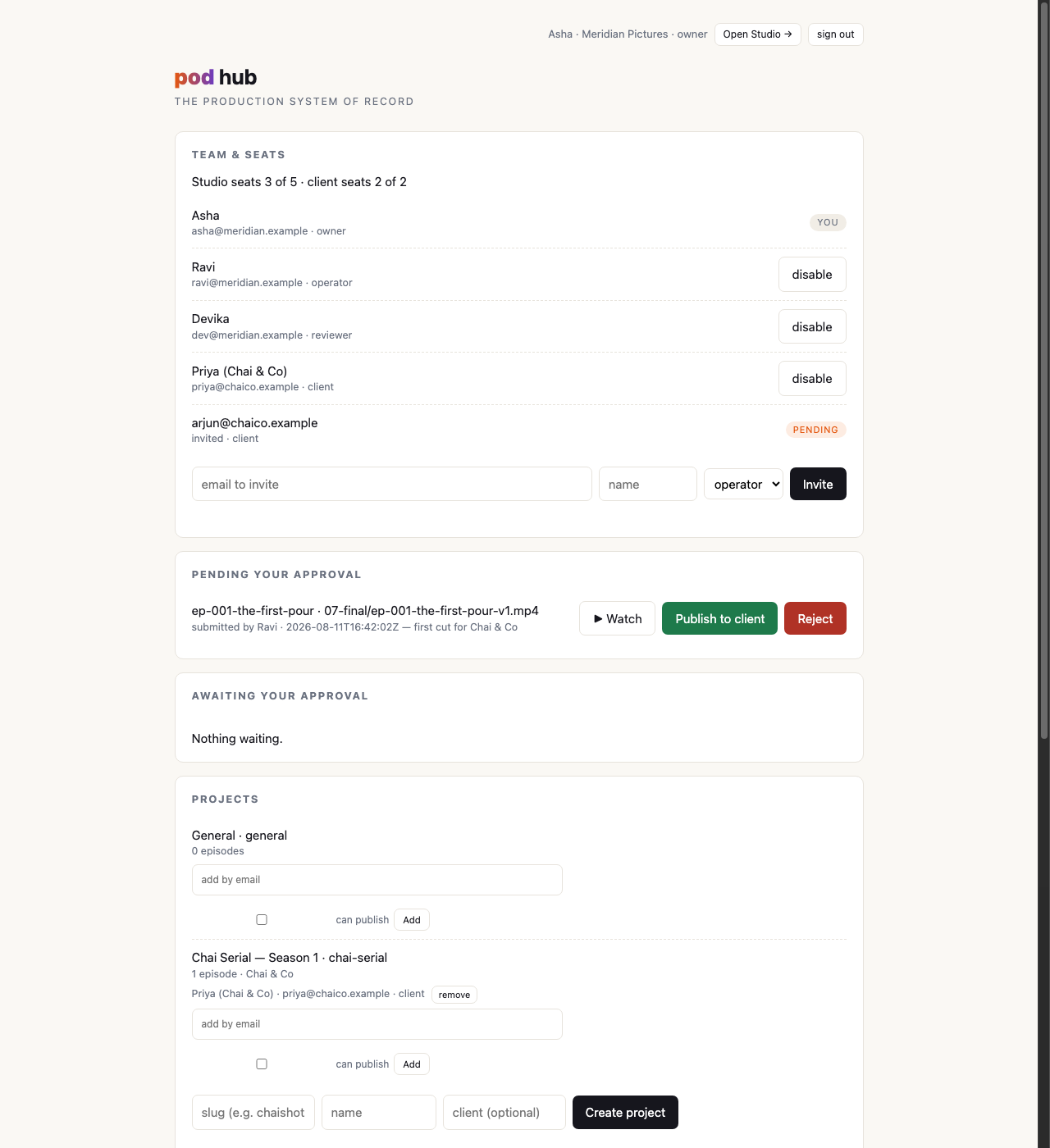
- hub.brainpuddle.com is for your studio: the approval queue, every episode in the org, projects and their members, seats and invites, the decision record.
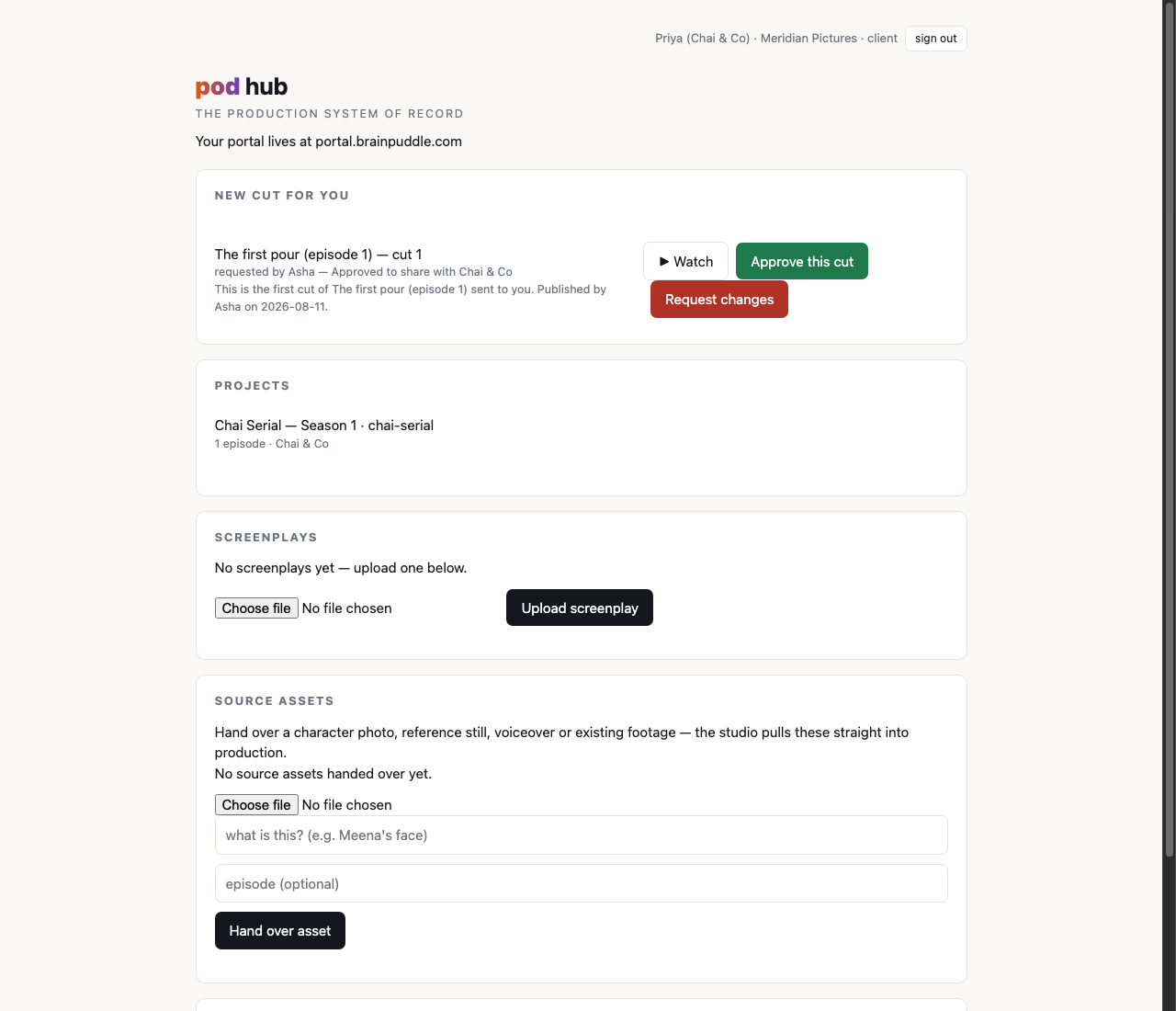
- portal.brainpuddle.com is for your customers: their projects, the cuts you've surfaced to them, their approvals and notes, and a way to hand you a screenplay or reference material.
The split exists so each side gets a front door that looks like theirs. A customer opening a 30-second spot should land on a page about their film, not on a studio management console with their one project hiding in it. And your operator shouldn't have to mentally filter out a client-facing layout to find the approval queue.
There is a third way in, and in practice it's the one your customer will use most: the review link you send them when a cut goes out. It isn't a front door at all: it opens one surfaced cut, needs no password, and reaches nothing else in the system. The portal is still where their whole history lives; the link is how a single decision gets asked for. It has its own page: rework & the notes loop.
What the studio sees on the hub
The owner's page opens on the thing that needs a person: pending your approval. Each item is a cut somebody on your team submitted, playable in place, with publish and reject-with-a-note beside it. Above it sits team & seats (who is in the studio, which chairs are left, and the invite form); below it the projects list, the screenplays and assets customers have sent in, and the studio's episodes with their status.
Publishing one adds a card underneath: the review links for that cut, one per client seat on the project, each with a copy control and a WhatsApp share button with the message already written. Send them from there. Further down, the strip marked awaiting client has a Send link button that gets them back for whatever cut is currently up, because the card is handed over once and a refresh loses it.
An operator's view is the same minus the parts that are the owner's job: no seat management, no user list, no approving other people's work. They get the whole studio's episodes, the shot-request boards, the ability to submit (their submissions sit under "your cuts awaiting the owner"), and, since sending is not the same as publishing, the same Send link control.
What the client sees on the portal
A project or two, and inside them the episodes you've filed there. Where you've surfaced a cut, it plays under new cut for you, with approve and request-changes beside it and a place to leave a note. Where you haven't, there's a name and a status and nothing to watch. Most customers will never see this page for a routine sign-off. They'll tap the link, answer, and get on with their day; the portal is where they go when they want the whole picture rather than one decision.
They can also send things to you: a screenplay for the next episode, reference photographs, a voice recording, a clip they want cut in. Those land in your inbox on the hub, and your operator pulls them straight into an episode's workspace.
The terminal side, for your crew
Your production doesn't move to a website. Your crew produce exactly the way they do today: the studio, the gates, the cost gate, the episodes folder on their own machine. What's new is a deliberate act of pushing an episode up so colleagues and clients can see it.
hub not configured and stop, which is also what they do on a copy of pod that belongs to no studio. Nobody has to type a token to make a film; this is plumbing between a studio and its own hub.pod projects
Lists the projects on your hub (slug, name, which customer, how many episodes are filed under each). This is how an operator finds out what to file under without asking anybody.
❯ pod projects
  slug          name                    client       episodes
  chai-serial   Chai Serial — Season 1  Chai & Co    1
  general       General                 —            0
  file an episode under one with  pod push <episode> --project <slug>
pod push <episode> --project <slug>
Syncs an episode's script, decisions and state up to the hub and files it under that project. The project is remembered: later pushes of the same episode keep it without the flag, so it's one decision at the start of an episode, not a thing to retype and eventually get wrong. A push with no project at all lands in the studio's general project.
❯ pod push ep-001-the-first-pour --project chai-serial --media
  (script, decisions, state — and with --media, the stills and clips too)
--media also sends the footage. Without it a push is text only: what was decided, not what was rendered. That's enough for a colleague to pick the episode up, and not enough for anyone to watch it.
pod push <episode> --submit
Push and submit in one command: it sends the episode, sends the footage (--submit implies --media, because the gate won't point at bytes the hub doesn't hold), and then files the cut at the publish gate. Add --note for a line to whoever reviews it.
❯ pod push ep-001-the-first-pour --submit --note "first cut for Chai & Co"
  submitted for review: 07-final/ep-001-the-first-pour-v1-review.mp4 (review proxy)
  waiting on someone with standing to publish it
Note what it submitted: the review copy, not the master. A client pressing play streams the light ~540p cut, so review doesn't drag a full-resolution master across the internet every time somebody watches it. The master's fingerprint travels with the submission, so the record still says exactly which delivery file the review stands for. If a cut has no review copy, the master is submitted instead and pod tells you so on the same line.
The last line is the gate answering. Submit as the owner, or as someone holding the publishing grant on that project, and instead of waiting it says the cut went out and prints the review link for each client seat, ready to copy into a chat.
pod notes <episode>
Reads the client's side back to you without opening a browser: their answer to the cut (approved, or changes requested, with what they said), and every note still waiting on you, each one stamped with the shot it belongs to. A note the customer left at a timecode is filed against the shot that was on screen at that second, and marked as having got there by its timecode rather than by their aim.
❯ pod notes ep-001-the-first-pour
  ep-001-the-first-pour — what the client said
  asked for changes  Priya (Chai & Co) · 2h ago
      "lovely, but the cup in the last shot is the old packaging"

  1 open note waiting on you
    ≈ shot-07  at 0:22  #14 · Priya (Chai & Co) · 2h ago
      old packaging on the cup
The same notes appear inside Pod Studio, stamped on the shot they're about, with a "mark done" control that asks what you did before it will close anything.
pod pull <episode>
The other direction: pulls the material a customer handed over on the portal into the episode's workspace, where --assets routes it into the production as reference images, voice-over or footage. A client sending you their brand shots becomes one command on your side, and see using your own media for what the pipeline does with them.
push, and even then it isn't in front of a customer until it's been submitted and surfaced through the publish gate. Two deliberate acts, in that order.Your files stay yours
None of this changes where your work lives. The masters, the takes, the character sheets and the series canon are still in the episodes folder on your own machine, and that is still the copy to back up. The hub holds what your studio and your customers need to collaborate on: decisions, cuts you've chosen to share, and the record of what was said about them. See privacy & your files, which continues to apply exactly as written.
Next up is a studio, end to end, all of it as one worked example.